
Understanding Pre-Filled Links in Google Forms
What Is a Pre-Filled Link in Google Forms?
A pre-filled link in Google Forms is a special link. It already contains answers in some form fields.
In this guide, you will learn what a pre-filled link is, how it works, and why it is helpful. Let us get into it.
What Does “Pre-Filled” Mean?
Pre-filled simply means that some answers are added in advance.
These values can usually be edited unless you use additional settings or instructions.
Why Use a Pre-Filled Link in Google Forms?
Pre-filled links make forms easier and faster to complete.
They are useful because:
- They save time for respondents
- They reduce the effort you put into typing
- They improve data accuracy
- They help personalize forms
- They are helpful for repeated or internal forms
Common Use Cases for Pre-Filled Links
Pre-filled links are commonly used in many situations.
Some examples include:
- Feedback forms where the user name is already filled
- Event registrations with details that are known
- Internal surveys for teams or employees
- Customer support forms with ticket numbers
- Follow-up forms after purchases
How a Pre-Filled Link Works?
A pre-filled link works by attaching answer values to the form URL. When someone opens the link, Google Forms reads the values. It then places them into the correct questions.
The respondent can review the information. And then submit the form. There is no need to submit everything from scratch.
How to Create a Pre-Filled Link in Google Forms
For this:
- Open your Google Form
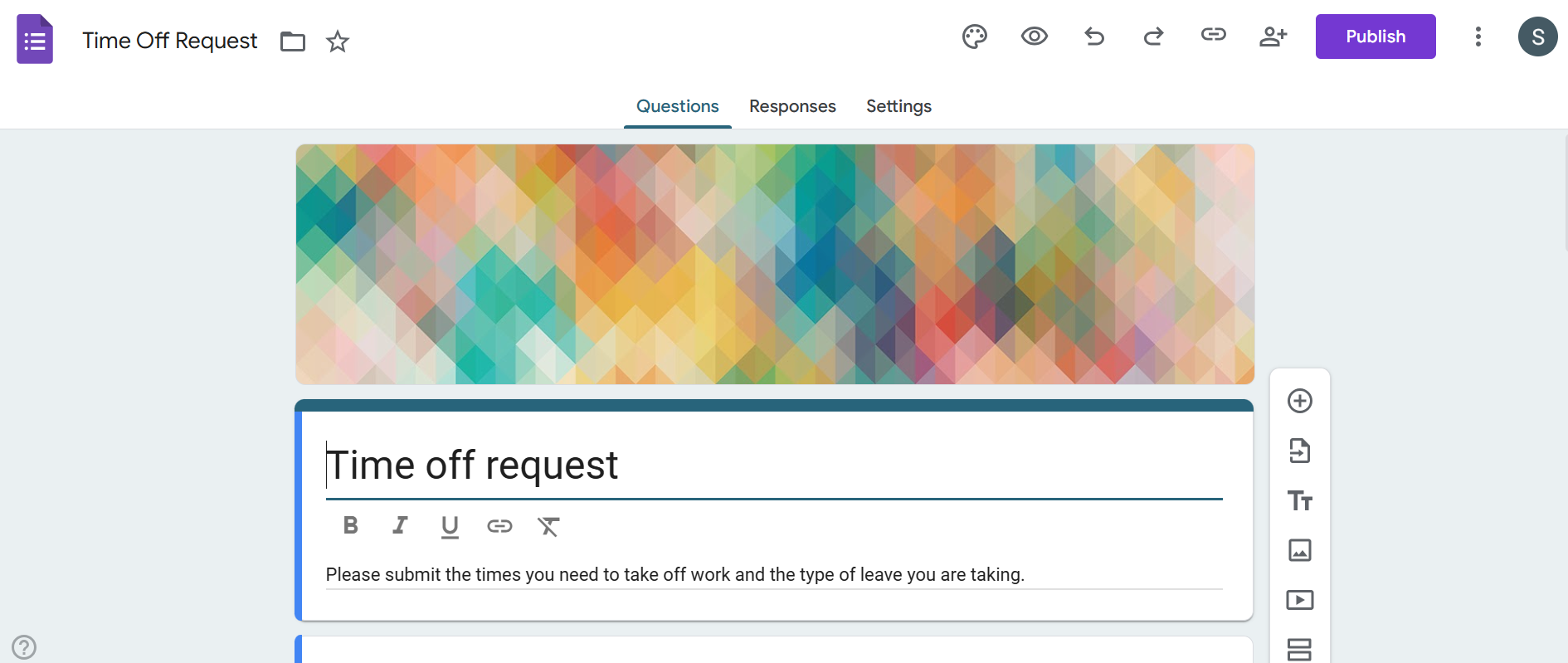
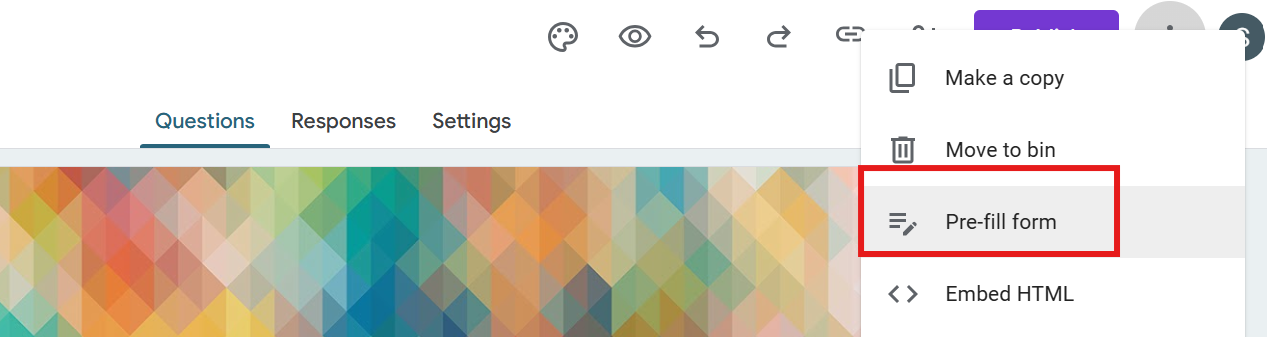
- Click on the three-dot menu (top-right corner)

- Select “Pre-fill form.”
- Enter the answers you want to pre-fill
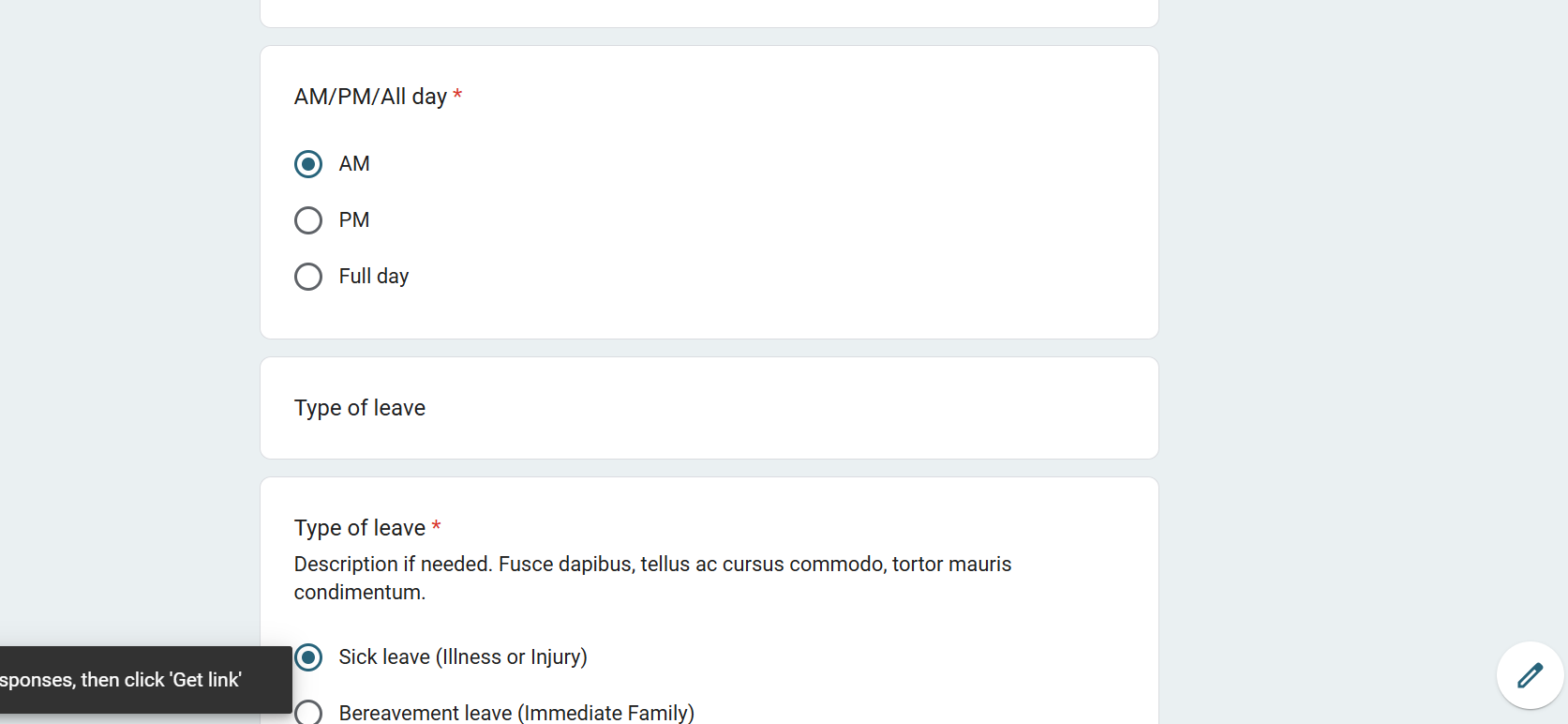
- Click on “Get Link”

You can now copy and share this link.
Pre-filled links work even better when your form layout and design are optimized. You can learn more about this in our guide on how to Customize Google Forms.
Can Respondents Change Pre-Filled Answers?
Yes. In most cases, respondents can edit the pre-filled answers. This can be done before submitting the form. This allows flexibility if changes are needed.
If you want to prevent any changes, then you may need additional tools or instructions.
Benefits of Using Pre-Filled Links
Main benefits include:
- Faster form completion
- Reduced errors
- Data collection that is consistent
- Better response rates
- Improved personalization
Limitations of Pre-Filled Links
While useful, pre-filled links also have limitations.
- They do not lock answers by default
- Links can be shared accidentally
- Sensitive data should be used carefully
- Manual setup is needed for each link
Creating Pre-Filled Forms Faster With MagicForm
Creating multiple pre-filled links manually can take up so much of your time. MagicForm.app, an AI-powered quiz maker, helps simplify this by generating structured forms. It supports smart data handling.
With MagicForm, you can focus more on collecting information instead of managing links and setup. This is especially helpful for teams and for businesses that use Google Forms regularly.
Conclusion
A pre-filled link in Google Forms is a powerful feature that helps save time. It reduces errors and improves the form experience. It is useful for feedback, surveys, registrations, and internal workflows.
When used correctly, pre-filled links make data collection smoother. It makes it more efficient. MagicForm further simplifies the process. It helps you manage forms faster and more effectively.
Also: Read How to Make Google Form Public.
FAQs
Q1. What is the main purpose of a pre-filled link?
To save time by filling in known information in advance.
Q2. Are pre-filled links secure?
They are safe for basic data but should not include sensitive information.
Q3. Can I create multiple pre-filled links for one form?
Yes. You can generate different links with different pre-filled values.
Q4. Do pre-filled links affect existing responses?
No. They only affect how the form opens, not stored responses.
Q5. Can MagicForm work with pre-filled Google Forms?
Yes. MagicForm supports efficient form creation and management, including forms used with pre-filled links.
Q6. Can I use pre-filled links for surveys with many questions?
Yes. Pre-filled links work well even for long surveys, as long as the questions support text or selectable answers.
Q7. Will pre-filled links work on mobile devices?
Yes. Pre-filled Google Form links work on both desktop and mobile devices without any issues.