
Understanding Response Validation in Google Forms
Response validation helps you control what people can enter in a form field. In this guide, you will learn what response validation in Google Forms is. You will understand why it is useful and how to use it step by step. Let us get into it.
What Is Response Validation?
Response Validation is a feature in Google Forms that lets you set rules for answers. This rule makes sure that the respondents enter the data correctly.
For example, you can require:
- A text answer within a minimum length
- A valid email format
- A number within a range
- A specific pattern of characters
Why Is Response Validation Important?
It helps you:
- Avoid messy data
- Collect accurate information
- Reduce manual corrections
- Keep responses consistent
- Save time during analysis
When Should You Use Response Validation?
Response validation is helpful when you need specific information.
For example:
- Collecting phone numbers
- Asking for age or number ranges
- Requesting email addresses
- Limiting word counts in answers
- Accepting only certain formats
Method 1: Add Response Validation to a Short Answer Question
For this:
- Open your Google Form

- Add a short-answer question

- Type your question
For example, “Enter your age.”
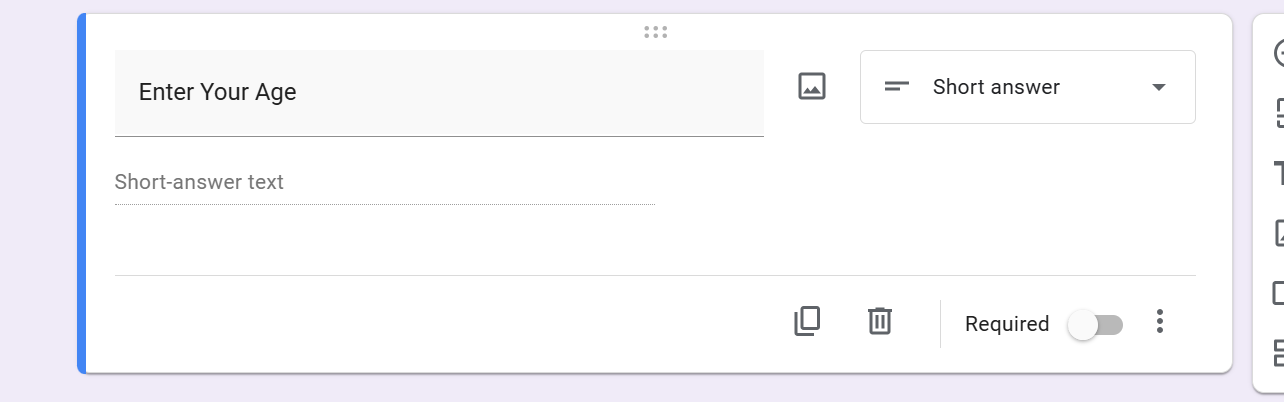
- Click the three-dot menu at the bottom right

- Select Response Validation

A new rule section appears. Choose the rule type, such as number, text, or length. Then set the condition.
For example, you can set: Number → between → 18 and 60
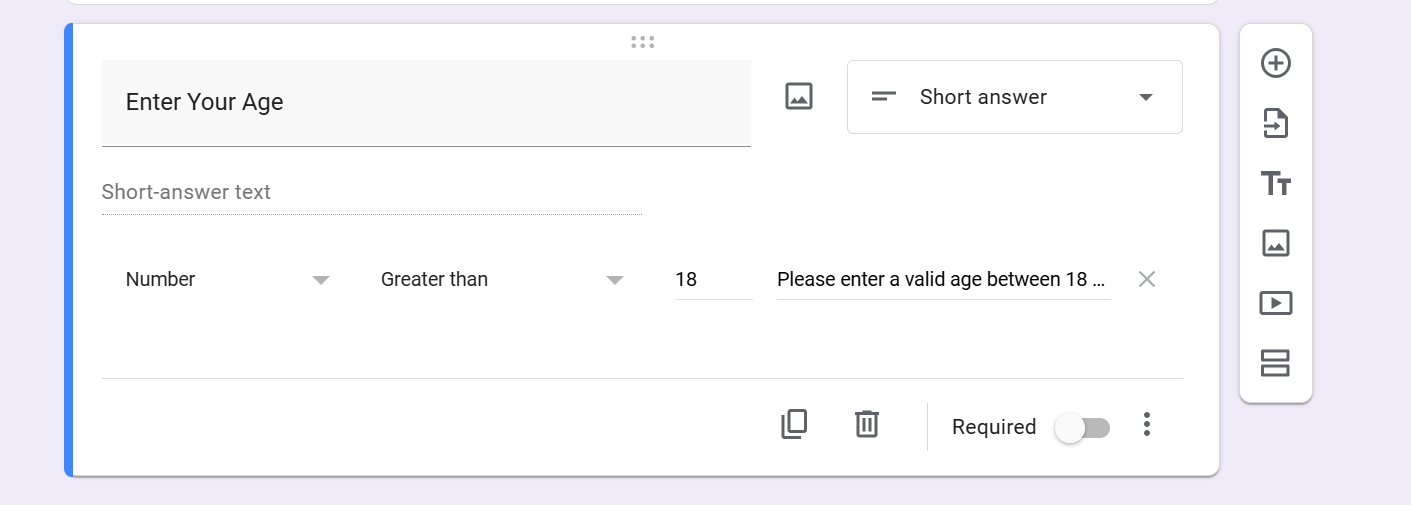
You can also add a custom error message like “Please enter a valid age between 18 and 60.”
Now the form will only accept valid answers.
Method 2: Validate Email Addresses
Create a short answer question asking for an email.
Click the three-dot menu and enable response validation
- Choose Text → Email address

Method 3: Set Text Length Limits
Enable response validation and choose Length. Then set minimum or maximum character limits.
For example:
- Minimum 10 characters for feedback
- Maximum 50 characters for short replies

Testing Response Validation
- Always test your form
- Enter an incorrect answer to check if validation works
- Check if error messages appear correctly
If you notice too many incorrect entries even after setting rules, you can always stop taking responses in Google Forms until you fix your settings.
Common Mistakes to Avoid
- Using validation on the wrong question type
- Setting very strict limits
- Forgetting to test rules
- Writing unclear error messages
Tips for Using Response Validation Effectively
- Use it only when it is necessary
- Keep rules simple
- Give clear instructions
- Always test before sharing
Creating Structured Forms Faster With MagicForm
Building forms with proper validation can take time. You must think about rules, formats, and question types.

MagicForm.app, is an AI-powered quiz maker tool that helps generate structured forms faster. It suggests well-formatted questions. In this way, your forms are clearer from the start.
While response validation is set inside Google Forms, MagicForm helps you design better forms. This reduces the need for corrections later.
Conclusion
Response validation in Google Forms helps ensure respondents enter the correct type of information. This improves the quality of your data. When combined with tools like MagicForm, creating accurate and well-structured forms becomes even easier. Learning this feature can make your Google Forms much more effective.
Also: Read How to clear responses in Google Forms.
FAQs
Q1. Does response validation work on all question types in Google Forms? No. Response validation mainly works with short answers and paragraph questions where users type responses. It does not apply to multiple-choice, checkboxes, or dropdown questions since those already limit answers.
Q2. Can respondents skip response validation rules? No. If validation is turned on, respondents must enter a valid answer before submitting the form. Google Forms will show an error message until the answer meets your rule.
Q3. Is response validation free in Google Forms? Yes. Response validation is a built-in feature and completely free to use. Anyone with a Google account can apply validation rules to their forms.
Q4. Can I edit validation rules after sharing the form? Yes. You can change or remove validation rules anytime. The updates apply immediately to new responses, so you can adjust rules if needed.
Q5. Does response validation make forms harder to fill out? Not if used properly. When rules are simple and error messages are clear, validation actually helps users enter the correct information faster.
Q6. How does MagicForm help with response validation? MagicForm helps you create structured and clear questions quickly. While validation settings are added inside Google Forms, well-written questions from MagicForm reduce confusion and the need for strict validation rules.